
如何同时使用多个 GIT 帐户 ?
作为软件开发人员或系统管理员,你可能需要多个不同的账号用于多个 Git 代码仓库。例如,您可能拥有多个 Github、Gitlab、Bitbucket 或 AWS Codecommit 项目账户。如果您使用的是 http/https 协议访问 git 仓库,可能会遇到认证问题。在这种情况下,基于 ssh 方式访问仓库是最佳选择。
本文将帮助您配置 Linux 系统,将多个 GIT 帐户与基于 SSH 密钥对的访问联系起来。
Step 1 – Generate New SSH keys
首先,检查所有可用 SSH keys,避免被覆盖
ls -l ~/.ssh
使用下面的命令创建第一个密钥对
ssh-keygen -t rsa -C "your-email"
- 用您的电子邮件地址执行上述命令。
- 设置一个新的文件路径,以防止覆盖现有文件
- 按 enter 键输入 passsphrase 并确认 passsphrase 以保持其为空
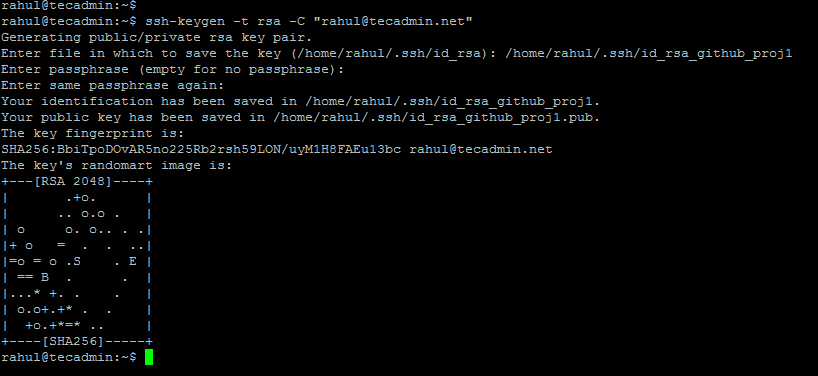
上面的命令将在 ~/.ssh 目录下创建两个文件,一个是私钥,一个是公钥。
- Private key: ~/.ssh/id_rsa_github_proj1 (不要和任何人分享这个文件)
- Public key: ~/.ssh/id_rsa_github_proj1.pub (将此文件上传到您的 Git 帐户)
注意: 使用以上命令创建更多 SSH 密钥对,请记住更改文件名以防止文件覆盖。
Step 2 – Attach SSH keys to Git Accounts
将 SSH 密钥添加到相应的 GitHub、Gitlab、AWS Codecommit 和其他 Git 帐户中。
Step 3 – Create Git Config File
接下来,创建 SSH 配置文件。默认情况下,用户 ssh 配置文件在主目录的 .ssh 目录下。
nano ~/.ssh/config
将以下内容追加到文件末尾
Host github-proj1
HostName github.com
User git
IdentityFile ~/.ssh/id_rsa_github_proj1

Host github-proj2
HostName github.com
User git
IdentityFile ~/.ssh/id_rsa_github_proj2

Host aws-codecommit-proj3
Hostname git-codecommit.us-east-2.amazonaws.com
User TECADMIN0123456789
IdentityFile ~/.ssh/id_rsa_aws_codecommit_proj3
Step 4 – Let’s Start Your Work
For a New Repository
Repository from first Github account:
git clone ssh://github-proj1/user1/repo.git
Repository from second Github account:
git clone ssh://github-proj2/user2/repo.git
Repository from AWS CodeCommit account:
git clone ssh://aws-codecommit-proj3/v1/repos/myrepo
For an existing codebase
cd my-code
git init
git remote add ssh://github-proj2/user2/repo.git
git add .
git commit -m "Initial commit"
git push origin master
我的开源项目

评论已关闭
关于作者

首席钢琴师